Every wave
counted.
Every setup graded.
Mirra Master Elliott Wave counts the impulse and the correction on two degrees, rejects any count that breaks the rules, projects where the wave should end and grades the trade that follows — then the Mirra AI explains it in plain words. Free for every Accelpix subscriber, scanner included.
Three ways
the count
saves you money.
Elliott Wave earns its reputation for being subjective when the count is drawn by hand. These are the three mistakes that cost the most — and each one is a rule the engine will not break.
Two analysts, two counts. One rulebook.
Forcing the count you want to see
A hand-drawn count bends to fit the trade you already like — and the rules quietly get broken.
Buying wave 5 as if it were wave 3
The move looks strong, you join late, and you are the last buyer before the correction.
Catching a correction too early
You buy the first dip, the correction keeps going, and the stop goes before the trend resumes.
One count.
Five voices.
Your level.
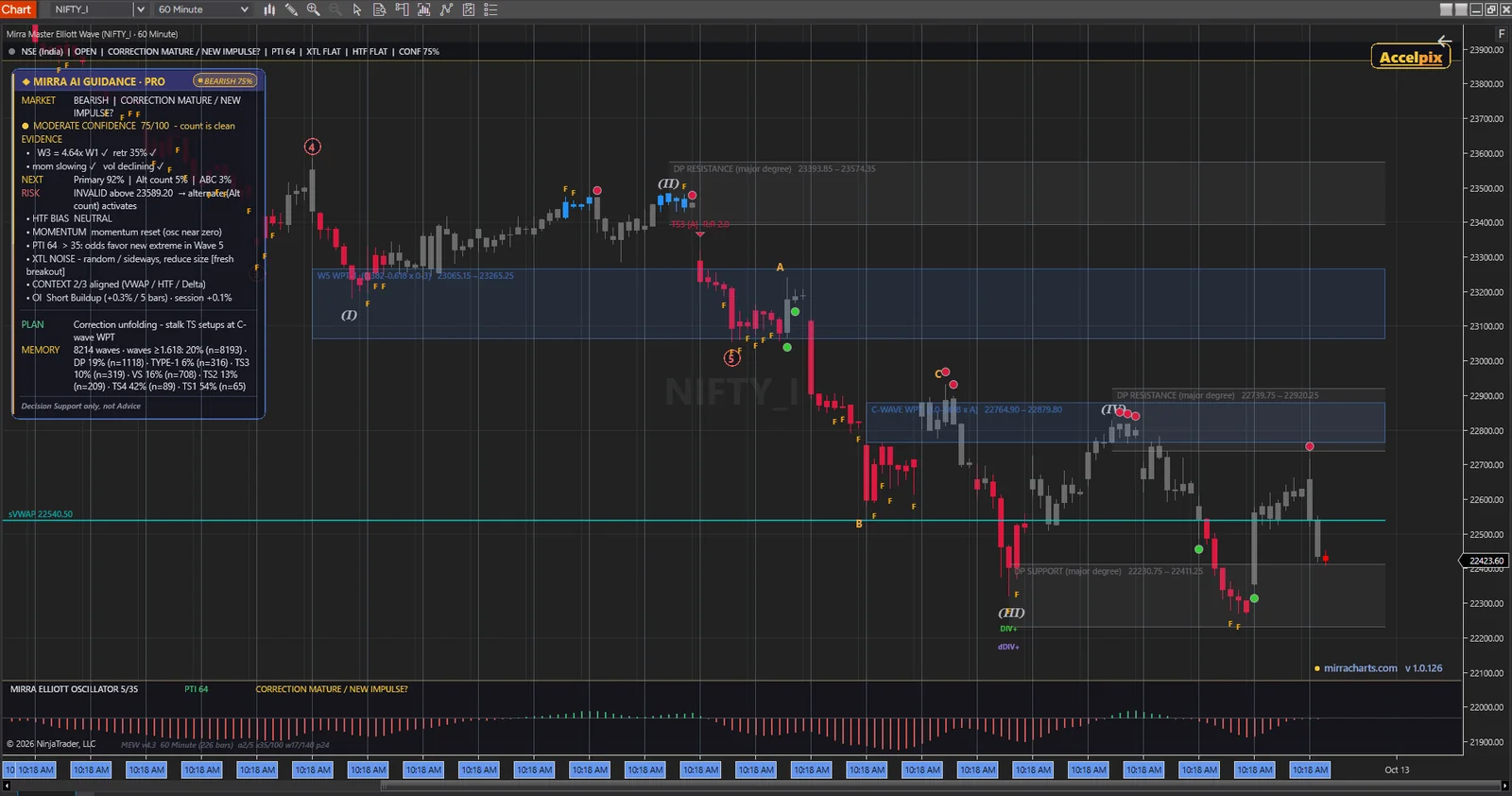
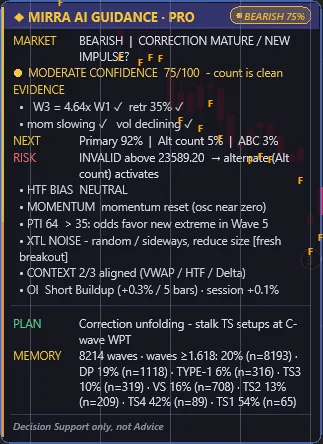
The same wave state, the same conclusion, explained at whatever level you trade at. Change one dropdown and the panel changes its language, never its answer.
It tells you where the count is wrong. Before you ask.
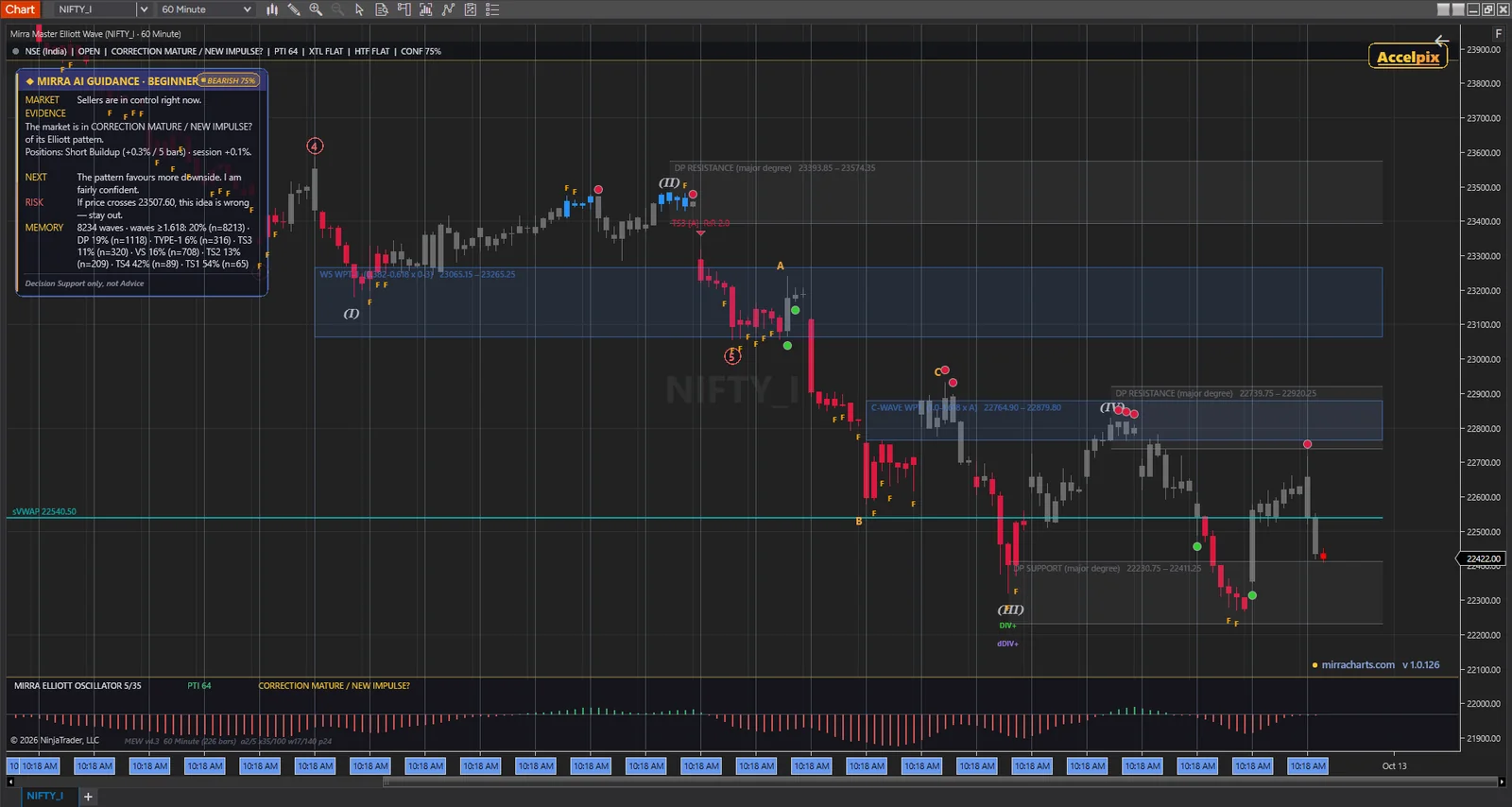
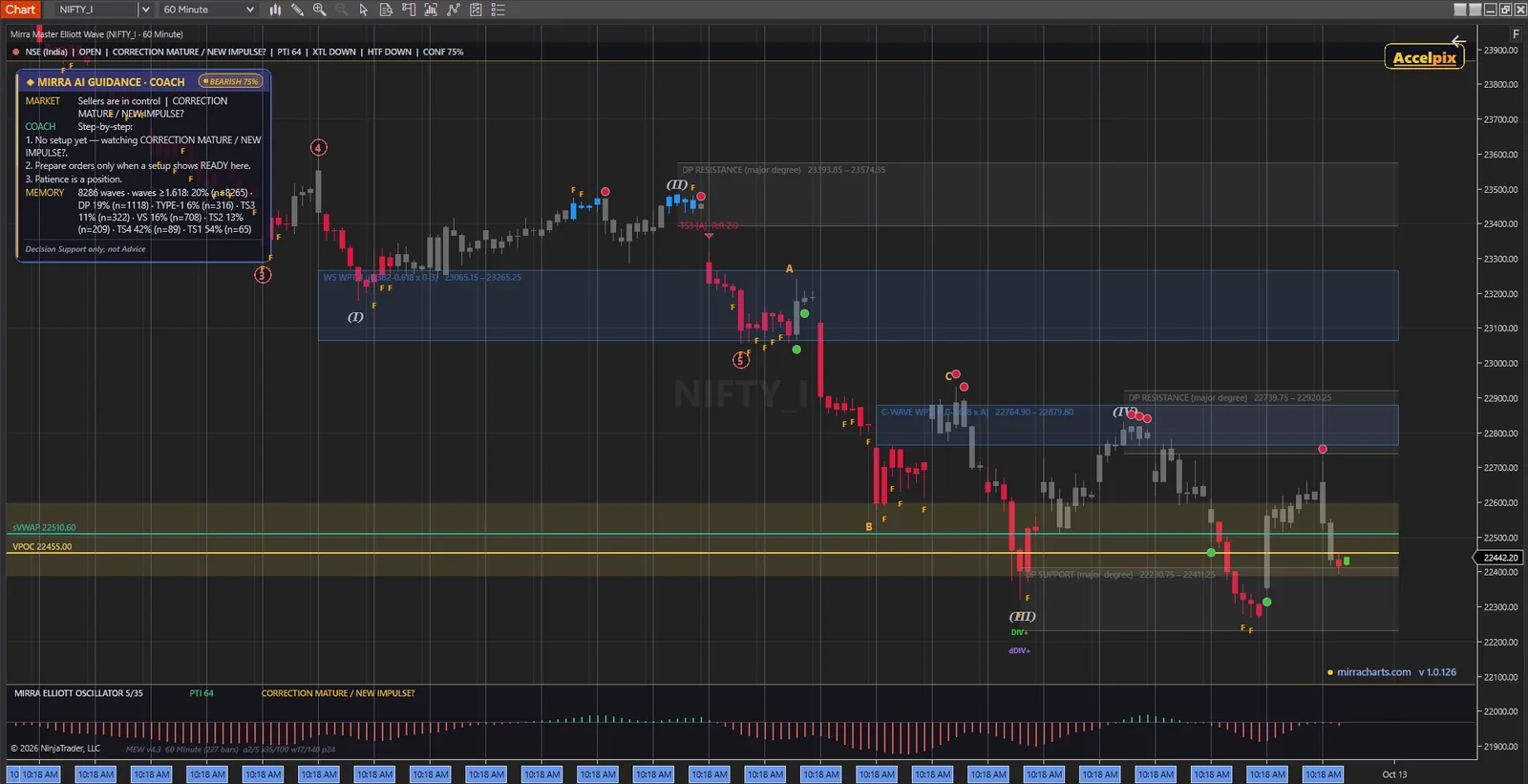
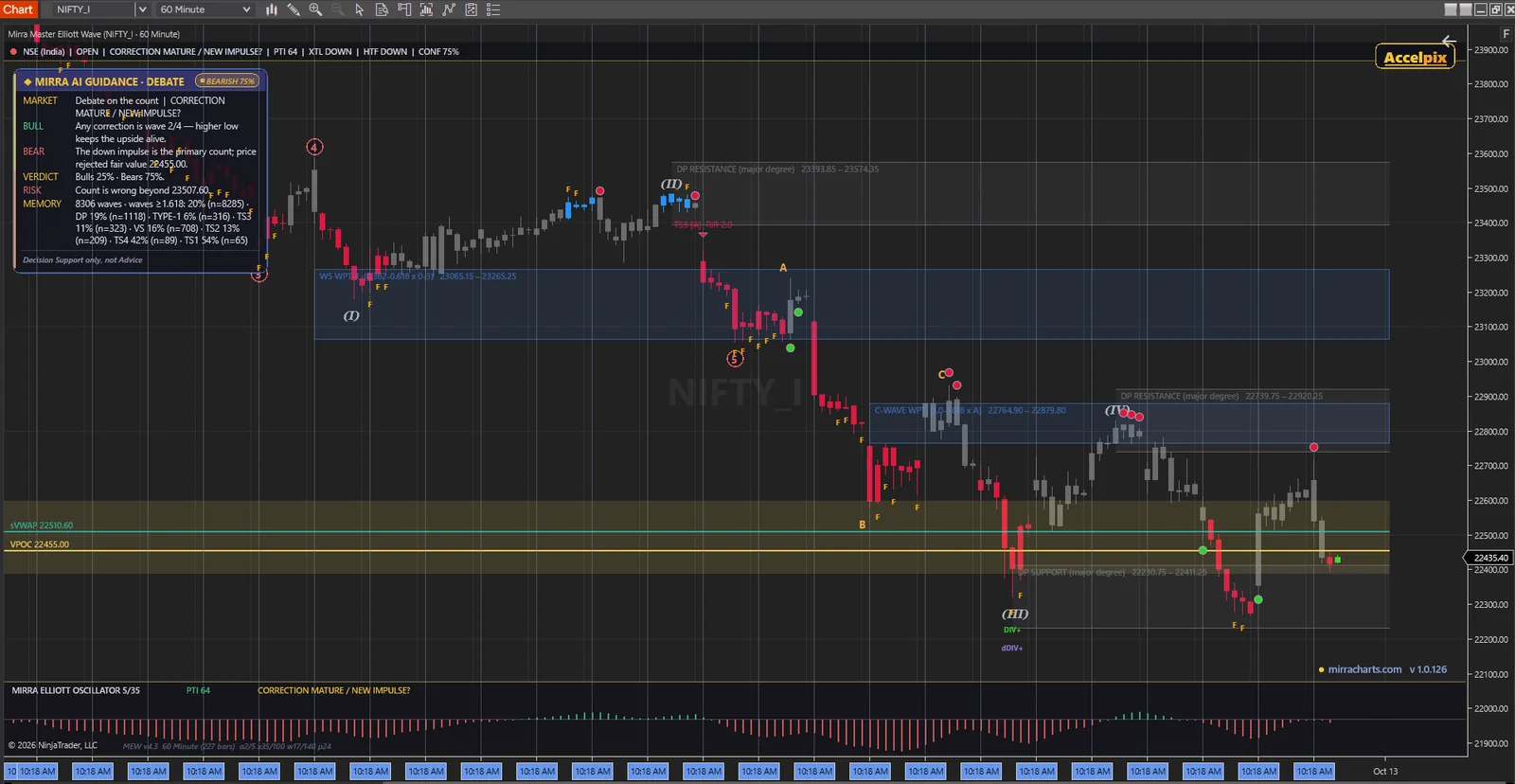
What it draws,
and why it matters.
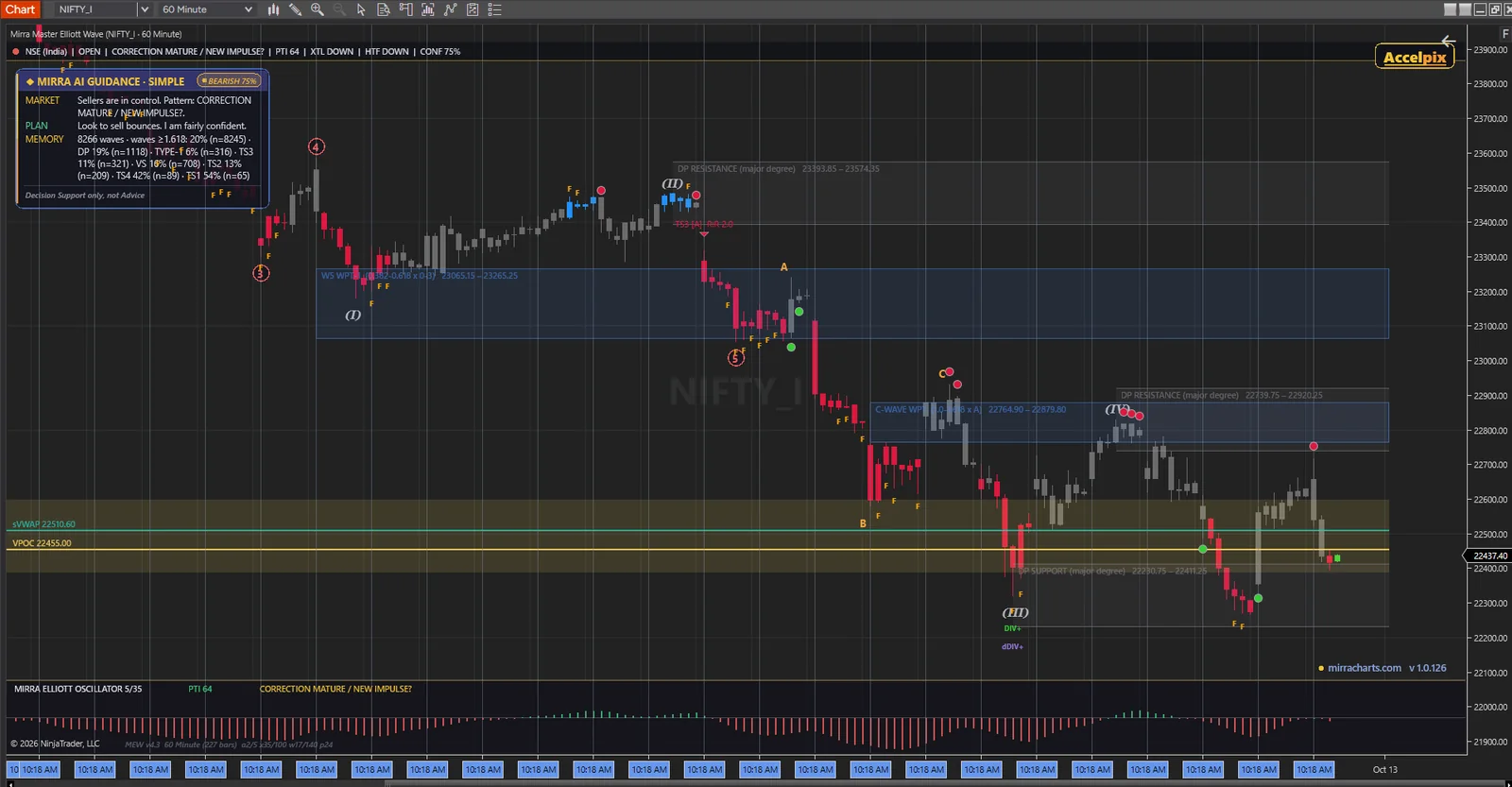
A complete Elliott Wave workstation in one indicator — the count, the confirmation, the targets, the trade and the risk.
Rule-checked counts, two degrees
Impulse 1–5 and correction A–B–C on a minor and a major degree. Wave 2 may not retrace all of wave 1, wave 3 is never the shortest, wave 4 may not overlap wave 1 — a count that breaks a rule is rejected.
Ten mechanical setups
GET Type 1 and Type 2, TS1–TS4, two wave-3 entries, Decision Point and Volume Spike — each with entry, stop, T1 and T2 on the chart.
Graded on nine factors
Every setup arrives as A+, A or B with a probability held between 15% and 85% — then calibrated by what actually happened on your instrument.
The OI regime behind every leg
Long buildup, short buildup, short covering or long unwinding, with session OI change and OI velocity — through the Accelpix feed.
Mirra Memory
Every completed wave and every setup outcome is logged per instrument, so the panel quotes real hit rates, not textbook ones.
Never certain
Wave confidence is held between 12% and 88%, every read names its own invalidation, and the panel always ends with “decision support only, not advice”.
Profit-Taking Index
Above 35 favours a fifth wave still to come; below 35 warns the trend may already be done.
Trend Locator bars
Bars painted blue for a structural uptrend, red for a downtrend and dim for noise — with break-out bar detection.
The 5/35 Elliott Oscillator
Drawn as a strip inside the chart, with the wave 5 divergence that marks exhaustion.
False Bar Stochastic
Stochastic signals checked against the trend, so counter-trend noise is flagged instead of traded.
Wave Price Targets
Fibonacci cluster zones where wave 3, wave 5 or wave C should run out, printed with their prices.
Wave 4 zones and channels
Green 24–38%, amber 38–50% and red 50–62% retracement zones, plus three wave 4 channels.
Make-or-Break and the Ellipse
A wave 5 termination zone and a price-and-time ellipse for the end of wave 4.
Fibonacci target matrix
A right-edge ladder showing where projections from different waves agree.
Bungee tunnel
An EMA tunnel with stretch shading, so an over-extended leg is obvious at a glance.
Position sizing and trade module
Size from your equity and risk %, F&O lot-aware, with higher-timeframe bias and live R on open trades.
The suite volume profile
VPOC and value area built on the same rules as Mirra Market Profile, so levels match across your charts.
A full alert engine
New setups, XTL break-outs, PTI below 35, a touch of the Make-or-Break zone and entry into the wave 4 zone.
Ten setups.
One rulebook.
Mechanical entries at the points Elliott traders care about most — the end of a correction and the end of an impulse. Each one is drawn with its entry, stop, two targets and a grade.
End of wave 4
Joins the trend as the wave 4 correction finishes — the classic entry for the fifth wave.
Wave 5 exhaustion
A reversal setup at the end of the impulse, when PTI, divergence and the Make-or-Break zone line up.
End of an A-B-C
Four mechanical entries on the termination of a corrective wave, from shallow to deep.
Into wave 3
The same corrective-end logic applied to catch the strongest leg of the move.
Decision Point
Divergence at a higher-degree support or resistance zone — where the bigger trend decides.
Volume spike
Fades a climactic volume spike at the edge of a move.
Entry, stop, T1, T2, reward-to-risk and position size for the active setup — sized from your equity and risk %, with the F&O lot detected automatically.
Your watchlist.
Your own rules.
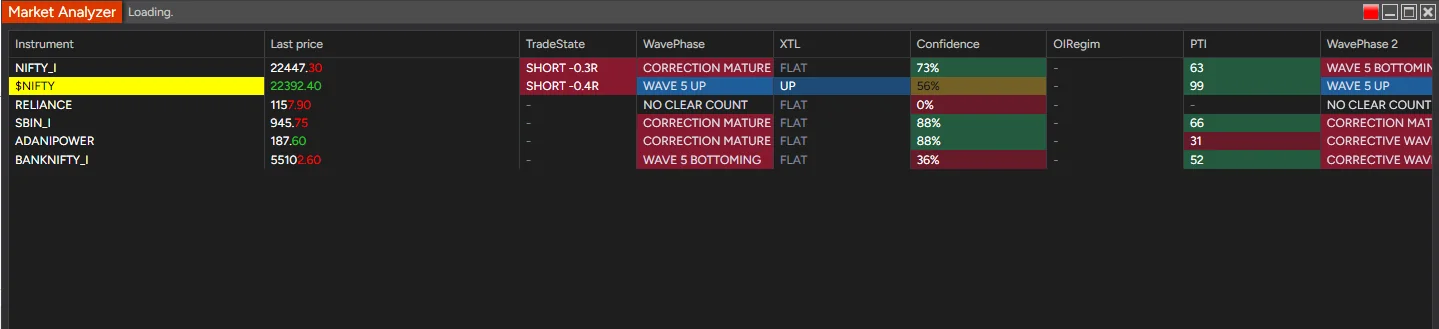
Mirra Master EW Scanner runs the identical wave engine across your Market Analyzer watchlist — eleven scan modes, five signal filters and up to five custom rules with alerts. Add the column several times, each in a different mode, and click a header to rank the whole list.
You cannot count fifty charts. It can.
On your charts
in ten minutes.
One installer puts both the indicator and the scanner into NinjaTrader 8.
Get NinjaTrader 8
Register, download and install the latest NinjaTrader 8. Free — no card required.
Download NinjaTrader →Download the installer
Mirra_Master_Elliott_Wave+Scanner_NT8.exe — close NinjaTrader, run it, then start NinjaTrader again.
Load it on a chart
Add Mirra Master Elliott Wave, pick your AI mode — Simple, Beginner, Coach, Debate or Pro — and the count appears.
Setup guide →Add the scanner
In Market Analyzer, add the MirraMasterEWScanner column, choose a scan mode and set a data series.
Scanner guide →Free.
With every Accelpix plan.
Mirra Master Elliott Wave joins the free Mirra series. Every Accelpix subscriber gets the indicator and the scanner at no cost; activate it with your Machine ID.
- The full Elliott Wave indicator
- The EW Scanner for Market Analyzer
- All five AI modes and Mirra Memory
- Open Interest regime with an Accelpix OI subscription
- Register on Accelpix in two minutes
- Live NSE, BSE and MCX market data
- Elliott Wave and the basic Mirra indicators included with your plan
- Upgrade to the AI Market Profile or Order Flow any time
Want the AI auction and the tape too? See Mirra Advanced Market Profile and Mirra Advanced Order Flow.
Five short answers.
Is it really free?
Yes. Mirra Master Elliott Wave and its scanner are free for every Accelpix subscriber, on any Accelpix data plan. Download the installer, then activate with your Machine ID from your registered Accelpix email.
Do I need Accelpix data for it to work?
The wave counts, setups, oscillators and AI read work on any NinjaTrader 8 chart. The Open Interest features need an active Accelpix OI data subscription and stay blank without it.
Does the count change after the fact?
The newest leg can be relabelled until its turning point is confirmed — that is true of every automatic Elliott count. Completed waves are fixed and logged, and the panel shows its confidence and what would invalidate the read.
Which markets and timeframes?
Any instrument in NinjaTrader 8, from intraday charts to daily. 22 exchange presets set the session and F&O lot size automatically.
How does it fit with Market Profile and Order Flow?
Elliott Wave reads the structure of the swing; Market Profile reads where value was built; Order Flow reads who is in control. The same AI language runs through all three, and the volume profile levels match across them.
Count the next
wave properly,
starting today.
One installer, the indicator and the scanner, all five AI voices. Download it, load it on the chart you trade, and let the rules do the counting.
Download freeQuestions? Live chat on mirracharts.com